The AI Operating Workspace

Turn business workflows into AI-powered apps.

Ghostrun gives every repeatable process a secure operating home: workflows, forms, records, dashboards, documents, projects, tasks, approvals, integrations, reports, and an AI coworker that helps move work forward across the whole workspace.

Parallel multi-step workflows
🤖 Multi-agent Data Intelligence
🛡️ Tenant isolation, MFA & audit logs
See what's inside

20-minute fit call. Start with one workflow, prove impact, then scale.

Ghostrun dashboard with the AI Daily Brief, apps, and recent workflow runs
The Workspace

An operating environment, not another tool.

Most AI products bolt a chatbot onto something old. Ghostrun is the workspace itself: a dashboard, apps, workflows, data, pages, and an AI copilot that all share the same context. Your team signs in and runs the day from there.

AI Daily Brief A narrative briefing on top of your dashboard with inline action links into the workspace.
Purpose-built apps Each app composes multiple workflows into a polished UI your team can run again and again.
Structured data Databases, tables, board views, and version history live alongside every workflow.
An AI coworker Ghost works alongside your team — drafts plans, runs workflows, writes records, sends emails, waits for your OK.
Ghostrun My Apps view — purpose-built apps grouped by function, each composing multiple workflows into a polished UI
What's Inside

Everything your team needs to execute, in one place.

Each surface in Ghostrun is built around real operational work — running things, capturing context, and getting structured outputs your team can act on.

Apps

Purpose-built workflow apps

Compose multiple workflows into a polished app your team runs every day, with structured input forms and saved runs.

  • Dashboard mode (parallel)
  • Sequence mode (chained steps)
  • Per-tenant configuration
Workflows

Multi-step AI workflows

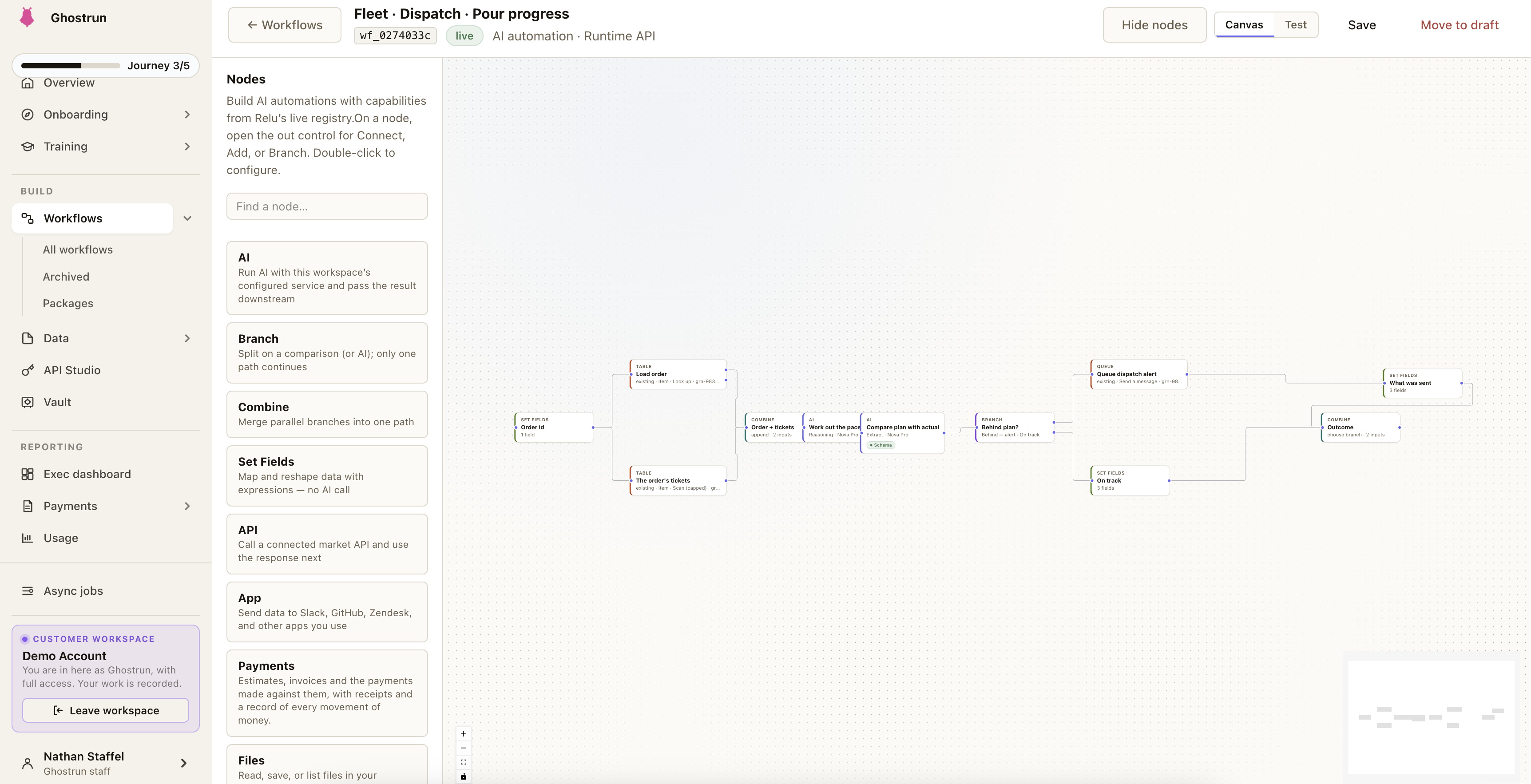
Chain AI capabilities, API integrations, and edit-required review steps. Outputs flow into databases, pages, and connected systems.

  • Parallel and sequential steps
  • Edit-required human checkpoints
  • Background runs with toast notifications
Data Intelligence

Native dashboards on every database

Open any database — KPIs, breakdown widgets, an AI-written narrative, and a multi-agent chat that drills into any chart all appear automatically.

  • Five specialist agents: quick lookup, analysis, research, reports, strategy
  • Scheduled email reports with trend deltas vs. last period
  • Pinned answers persist on the dashboard
Ghost Agent

An AI coworker that does the work

Not another chatbot. Ghost drafts a plan you can read, then runs the workflow, writes the record, sends the email, and assigns the task — pausing for your approval on anything that changes data. See how Plan Mode works ↓

  • Plan Mode for multi-step work across your apps
  • Cmd+K, side-panel chat, inline suggestions, walkthroughs
  • Pause, resume, or cancel any plan at any time
Databases

Structured records, not spreadsheets

Every workflow can read and write structured tables with stable schemas, board views for triage, and vector embeddings for retrieval.

  • Table, board, and detail views
  • Record history and comments
  • Vector search across records
Library, Pages & Domains

Collaborative outputs and publishing

The Workflow Archive stores artifacts, versioned outputs, and mini-apps. Pages let teams collaborate. Public pages can map to your own subdomains.

  • Artifacts, versioned outputs, mini-apps
  • Rich-text pages with embedded blocks
  • Public pages on custom subdomains via CNAME
Projects & Tasks

Operate against outcomes

Group related runs, artifacts, and databases into cross-app projects. Track follow-ups in app-scoped tasks with priorities and due dates.

  • Cross-app project workspaces
  • App-scoped tasks, low/medium/high priority
  • Tasks link to page blocks and database records
Knowledge & Documents

Business context, available everywhere

Admins curate Knowledge Blocks of reusable reference content that gets injected into workflow steps. The Document Drive holds files uploaded across apps.

  • Reusable Knowledge Blocks with categories
  • Document Drive across all apps
  • Injected as context at workflow runtime
Scheduling

Automated recurring runs

Schedule any workflow with a cron expression. Outputs route to a database, page, or integration so teams arrive to ready results.

  • Cron-based schedules
  • Output routing post-run
  • Run history and replays
A Day in Ghostrun

One workspace, every mode your team needs.

Run a workflow on demand, schedule it to repeat, push results into a database, and triage from a board — all without leaving Ghostrun.

Ghostrun My Apps view with app categories and cards
Workflow scheduling settings
Database table view inside an app
Database board view for triage and ownership
01 / WORKFLOWS

Launch and execute on demand

Trigger one-off workflow runs for research, enrichment, or content generation. Ghostrun streams progress and lands the output in your Workflow Archive.

02 / SCHEDULING

Automate recurring runs

Move repeatable work onto a cron schedule. Outputs route into the right database, page, or integration so teams arrive to decision-ready results.

03 / DATA TABLES

Operate from structured records

Workflow outputs land in databases with stable schemas and history. No more spreadsheets pretending to be a system of record.

04 / BOARD CONTEXT

Turn data into team action

Switch any database to a board view for triage and ownership. Pick up a record, run a workflow on it, ship the result.

Data Intelligence

A native BI dashboard for every database in your company.

Point Data Intelligence at any Ghostrun database and it auto-generates a live dashboard — defined KPIs, breakdown widgets, AI insights, scheduled email reports, and a multi-agent chat that drills into every chart. No external BI tool to license, no separate data warehouse to wire up.

Data Intelligence panel showing KPI cards, breakdown widgets, AI insights narrative, and a multi-agent chat thread
Highest conversion lift this week: onboarding nurture flow (+18.4%), followed by intent-based outreach (+12.1%).
The auto-dashboard, per database

Open a database. The dashboard builds itself.

Pick one or more databases. The dashboard renders in seconds — KPIs first, then breakdown widgets, then the AI-written insights. Cached, so it's there the moment you come back.

KPI cards

Your defined metrics, live

Every metric you define renders as a stat card with the current value, period-over-period change vs. the last snapshot, and a click-through that drills the chat into a breakdown of that exact KPI.

  • Count, sum, average, min, max, distinct, ratio
  • Currency, percentage, compact, or number formatting
  • Categories: KPI, Health, or Trend
  • Auto-suggest proposes 5–10 KPIs from your fields
Auto-built widgets

Breakdowns, rankings, timelines, pipelines

Ghostrun profiles your fields and emits the right widget type for each — bar-chart breakdowns of categoricals, top-N rankings on numeric fields, month-by-month timelines on date fields, and stacked progress bars on status/pipeline fields.

  • Click any segment to expand the matching records inline
  • Click any bar or row to drill the chat into that subset
  • Auto-detected from the data, not pre-configured
AI Insights narrative

A written analysis of what's actually in the data

Below the widgets, Ghostrun writes a 3–5 sentence narrative grounded only in the computed numbers and your domain knowledge — no invented values, no rounded approximations.

  • Cites exact metric values from the dashboard
  • Flags concentration risk, low percentages, anomalies
  • Suggested next investigations — click any one to drill into chat
  • One-click refresh; results cached per database
Pinned insights

Chat answers persist as dashboard cards

When a chat agent returns a chart or longer analysis, Ghostrun automatically promotes and pins it to the dashboard. Pinned insights are saved server-side and survive sign-out, page refresh, and teammates opening the same database.

  • Full-width interactive charts you can revisit any time
  • One-click remove when an insight goes stale
  • Re-ask the question for a fresh version
Scheduled reports

Trend-aware email reports on the cadence you choose.

Set a daily, weekly, monthly, or custom schedule per database. Each run recomputes your KPIs, compares them to the last reporting period, writes a 4–6 sentence executive summary, and emails it to the people you choose.

  • Real period-over-period trends. Every run is saved, so trend arrows compare against the actual previous period — not a recomputed estimate.
  • Headline, key changes, what to do next. The summary leads with the bottom line, highlights significant moves (>5%), and ends with actions tagged [URGENT], [SOON], or [MONITOR].
  • Speaks your business's language. Reports pull in your team's Knowledge Blocks, so the narrative uses your terms, not generic SaaS-speak.
  • Run now & pause. Send any scheduled report immediately, or pause and resume a schedule with one click.
  • Per-recipient time zones. 8am means 8am wherever your team is.
Weekly Report: Sales Pipeline Mon · 8:00am
Pipeline Value $2,847,500 ▲ 12.4%
Active Deals 147 ▲ 6.5%
Stale (> 30d) 23 ▼ 18.0%
Pipeline grew $314k week-over-week, driven by 9 new enterprise opportunities. Stale deals dropped from 28 to 23 after the Q4 cleanup.
→ [SOON] Review the 5 deals stuck in Negotiation for 21+ days.
Multi-agent chat

Five specialists, one router, every dashboard wired in.

Click a KPI card, breakdown segment, top-N row, timeline bar, or AI Insight action — any one of them drills the chat into a pre-filled query routed to the right agent. Or type a question yourself and let the router pick.

Fast lookup Quick Answer Single-number lookups, counts, and 1–4 sentence summaries. Stays in chat.
Internal data analysis Data Analyst Counts, distributions, outliers, and correlations from your databases, returned with clear tables.
Internal data + web research Research Analyst Finds the external context your data is missing, then ties internal and external findings together.
Charts and a written report Report Builder Interactive charts plus a polished multi-section report — Executive Summary, Key Metrics, Analysis, Recommendations.
Strategy with priorities Strategy Advisor Strategic patterns, priority actions tagged [CRITICAL]/[HIGH]/[MEDIUM], risks, and 30-day quick wins.

Every question reads your full dataset, surfaces the most relevant records, and answers in your business's language — using your defined metrics and your team's Knowledge Blocks as the source of truth.

Plus the connective tissue
Record Intelligence Open any record and get a per-record Summary, Related (vector-similar) records, and Analysis with anomalies and observations.
Cluster Analysis Discover hidden segments in any database. Ghostrun finds the natural groupings and names them, with the key differences and member counts called out.
Multi-database queries Select multiple databases at once. Records, dashboards, and pinned insights all merge into a single chat session.
Cross-app dashboard Data Intelligence works on every database in every app — one consistent BI surface, no per-app rebuilding.
Ghost Agent

Not a copilot. An AI coworker.

Most AI assistants read your screen and suggest what you should type. Ghost actually does it — runs the workflow, writes the record, sends the email, assigns the task — using the same workspace, the same data, and the same permissions your team uses. Nothing that changes data happens without your approval.

Most AI copilots
  • Suggest what you should do
  • Generate text you paste somewhere else
  • Confuse the names of your records and fields
  • Forget the conversation after you refresh
  • Can't actually run a workflow or send an email
Ghost
  • Drafts the steps, then runs them
  • Runs the workflow, writes the record, sends the email
  • Works on the actual records, fields, and people in your workspace
  • Plans you start at 9am are still running at 5pm
  • Adapts mid-run when the data changes the picture
Plan Mode

State a goal. Read the plan. Approve. Watch it run.

Type the goal in plain English — "intake the new lead, draft a tailored outreach email, save the deal, and assign Sarah a follow-up task for Friday." Ghost picks the right workflows, databases, and apps for the job, writes a step-by-step plan you can read, asks anything it's unsure about, and waits for your approval before changing a single record.

1
Built from your real workspace Ghost knows which workflows you have, which databases hold which records, who's on your team, and what each app does. The plan is built from your real workspace — not a generic template.
2
Real records and fields only — never made-up names Every workflow, database, app, and record in the plan is one you actually have. Anything Ghost can't verify is caught before you ever see the plan.
3
Edit the plan by typing Reviewing the draft? Reply with "change step 3 to assign to Jordan" or "add a review step after the email draft." Ghost updates the plan in place. No editor, no JSON, no menus.
4
Each step's output feeds the next The workflow's output becomes the database write. The fetched record becomes the email body. The retrieved report becomes the input to the follow-up plan. Work flows between steps the way it would in your head.
5
Adapts when reality changes After each step finishes, Ghost reads what actually happened and decides whether the rest of the plan still makes sense. If the data tells a different story, Ghost rewrites the remaining steps and shows you what changed.
6
You're always in control Pause, resume, or cancel any time. Insert a review step anywhere and Ghost stops to show you the work before continuing. Every change to your data — every record, every email, every task — waits for your OK.
Onboard new enterprise lead Running
3 / 6 steps 50%
Read latest lead from Inbound Leads Done · 1m ago
Run "Lead Enrichment" workflow Done · 47s
Save enriched lead to CRM Deals Saved · 8s ago
Run "Personalized Outreach Draft" Running…
4
Email draft to Sarah for approval Waiting for your OK
5
Assign follow-up task to Sarah · due Fri Queued
What Ghost can actually do

The same hands on your workspace as your team has.

Anything read-only is one click. Anything that changes data stops for your approval. Inside a plan, these chain together; in chat, you can fire them one at a time.

Find and pull data

Read-only · one click
  • Jump to anything — any record, workflow, app, page, or task is one tap away
  • Find related records across every database in your workspace at once
  • Pull a record — a specific one, or the latest, from any database
  • Open an existing output — report, draft, or analysis from your Library
  • Run an on-demand AI task — web search, run code, write something — when no workflow fits the moment

Workflows

Waits for your OK
  • Run any workflow in your workspace — with input from an earlier step, a record you pick, or a file you upload

Records

Waits for your OK
  • Create a record with fields filled in from an earlier step
  • Update a record — Ghost identifies the right one from your description, then changes only the fields you specified
  • Delete a record — always double-confirmation

Tasks

Waits for your OK
  • Create a task with title, priority, due date ("this Friday"), and assign it by teammate name — the standard assignment email goes out automatically
  • Update a task — status, priority, assignee, or due date
  • Delete a task

Email

Waits for your OK
  • Send email by address or by teammate name — subject and body filled in from an earlier step or written fresh

Library & Knowledge

Waits for your OK
  • Save the output as a versioned artifact in your Library
  • Add a Knowledge Block so the rest of the workspace picks up the same context next time

Plan control

Waits for your OK
  • Build a plan from a goal — opens Plan Mode pre-loaded
  • Insert a review step that pauses the plan and shows you the work before the next change
Where Ghost shows up

Five ways Ghost meets you — one brain behind all of them.

Daily Brief A narrative briefing at the top of your dashboard — what's new, what's stale, what's worth doing first. Every callout is clickable.
Heads-up cards Red, amber, and blue cards on the dashboard. Red for things breaking, amber for what to do next, blue for things worth knowing. Each one has a one-click action.
Side-panel chat Ask anything, kick off a plan, refine a draft, or watch a running plan finish. Always grounded in where you are in the workspace.
Cmd+K command bar One keystroke gets you to any page, workflow, app, database, output, or help topic. Recents pinned.
Inline on every record Open any record or output and Ghost suggests the next action based on what's actually there. New teammate? Ghost can walk them through any screen step by step.

Why Ghost isn't another AI chatbot.

Grounded in your real workspace, not your screen.

Ghost works on the actual workflows, databases, and people you have — not a fuzzy view of what's on a monitor. It can't suggest using a record you don't have or a workflow that doesn't exist.

Real execution, not "here's a draft you can paste."

When Ghost runs a workflow, it's the same workflow your team runs. When it assigns a task, the standard assignment email goes out. Same workspace, same permissions, same audit log — nothing happens off the books.

Plans you read before they run.

Multi-step work is drafted as a plan you can review, edit by typing, and approve. No more "the AI just did a thing and now I have to undo it."

You're always the one who says go.

Every change to your data waits for your approval. Insert a review step anywhere. Pause, resume, or cancel any plan at any moment. Ghost moves at your pace.

Integrations

Connected to the tools your team already uses.

Ghostrun connects to the tools your team already uses through secure managed OAuth. Workflows pull live data and trigger real actions in those services. For anything else, the encrypted API Key Vault lets you call any external API from a workflow.

CRM & Sales

HubSpot for contacts, deals, companies, and CRM workflows.

Productivity

Google Sheets, Google Docs, and Google Drive for daily collaboration.

Communication

Slack for messages, channels, and workflow notifications.

Accounting & Finance

QuickBooks for invoices, expenses, customers, and financial reports.

E-Commerce

Shopify for products, orders, customers, and inventory management.

Advertising & Marketing

Google Ads and Meta Marketing for campaigns, audiences, and performance.

Analytics

Metabase for dashboards, queries, and analytics data.

Workspaces & Automation

Smartsheet for sheets, rows, workspaces, sharing, and automation.

API Key Vault

Securely store custom API credentials and call any external service from a workflow.

Additional providers are added on request.

Security

Tenant-isolated by design.

Ghostrun is multi-tenant with strict tenant isolation, two-factor authentication, configurable PII handling, an encrypted credential vault, and a full audit log.

PII Detection & Redaction

Two per-workflow modes — Detect (flag and log) or Redact (mask before output) — across 12 detector types including names, emails, phones, SSNs, credit cards, addresses, and more.

Two-Factor Authentication

TOTP-based MFA using any authenticator app — Google Authenticator, Authy, 1Password, or similar. Required on every sign-in once enrolled.

Full Audit Log

Workflow runs, data views, data edits, artifact downloads, app access, and PII events are tracked and exportable to CSV.

Tenant Isolation

Every authenticated request is bound to a tenant. Data, integrations, knowledge, and API keys are scoped per tenant at the application and storage layers.

Encrypted API Key Vault

Customer-provided API keys are encrypted at rest and write-only after creation. Workflow API nodes reference keys by name; the value is never exposed in the editor or in responses.

Role-Based Access

Tenant admin vs. user roles gate sensitive surfaces — Integrations, API Key Vault, Audit Log, and Custom Domains are admin-only.

FAQ

Common questions

Most platforms bolt a chat box onto database-driven software. Business logic stays hard-coded. Ghostrun is built the other way around: it's a workspace where apps, workflows, data, and the assistant all share context. When your process changes, the workflows change — no engineering cycles required.

For company operations, no. Every Ghostrun database gets an auto-generated BI dashboard — KPI cards from defined metrics, auto-built breakdown / top-N / timeline / pipeline widgets, and an AI-written insights narrative — without licensing Tableau or wiring up a warehouse. Add scheduled email reports with trend deltas vs. the previous snapshot, plus a multi-agent chat that drills into every chart. For warehouse-scale historical analytics across many sources, Ghostrun complements rather than replaces a dedicated stack.

Your team signs in to Ghostrun. The dashboard shows the AI Daily Brief, recent runs, and quick navigation to Apps, Projects, Tasks, and Data Intel. People open an app, run a workflow, query databases with Data Intelligence, and use the Ghost copilot via Cmd+K. Scheduled workflows that ran overnight are already waiting in the Workflow Archive.

Out of the box, Ghostrun connects to HubSpot, Slack, QuickBooks, Shopify, Google Sheets / Docs / Drive, Google Ads, Meta Marketing, Smartsheet, and Metabase through secure managed OAuth. Additional providers are added on request. For anything else, the encrypted API Key Vault lets you call any external API from a workflow.

Multi-tenant with strict tenant isolation enforced on every authenticated request. Two-factor authentication via any TOTP authenticator app. Per-workflow PII handling with two modes (Detect or Redact) across 12 detector types. Encrypted API Key Vault for customer credentials. A full audit log of runs, data edits, artifact downloads, app access, and PII events, exportable to CSV. Role-based access for tenant admin surfaces.

Yes. Public pages built in Ghostrun can be mapped to your own subdomains (e.g., forms.yourcompany.com) via a CNAME record. SSL is provisioned automatically once DNS is verified, and the status updates in the Custom Domain Settings page as it propagates.

Most engagements start with one high-impact workflow and ship it in weeks, then expand. Teams typically see measurable lift inside the first 90 days. Adding the next workflow gets faster as Ghostrun accumulates Knowledge Blocks, structured data, and integration connections about your business.

Book a 20-minute fit call. We identify one high-impact workflow for your business, build it on Ghostrun, and provision your tenant. You see results in 90 days, then decide what to expand next.

See Ghostrun in action

Book a 20-minute fit call. Here's what happens next:

1

We identify one high-impact workflow for your business.

2

We build it on Ghostrun and provision your tenant.

3

You see results in 90 days and decide what to expand next.

Start with one workflow. Prove the impact. Scale from results.